AI product photography for electronics: clean surfaces, honest scale and a colour that sells
How we make AI images of earbuds and headphones that hold up: an honest packshot, matte surfaces, ports that stay put, and where tech brands should skip AI.
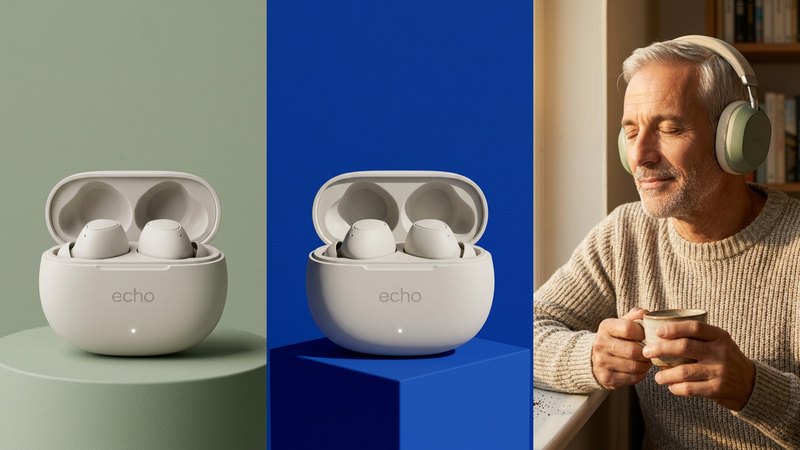
Small electronics look simple to photograph and are one of the hardest things to get right. Earbuds, headphones, chargers and speakers are smooth, matte, often white, and covered in tiny details that a buyer checks closely: the ports, the buttons, the status light, the seam where the case opens.
So AI product photography for electronics is a busy search, and most of the results are tool pages with one perfect render. They don't tell you why so many AI gadget images look like a 3D mock-up, or which images a tech brand should never let AI make.
We make AI product images and video ads for DTC brands. To find out what holds up for tech, we invented two products, ECHO (off-white wireless earbuds in a pebble-shaped case) and AURA (sage-green over-ear headphones), and built a set for each from one packshot. Both are concept brands, not clients. Here's what they taught us.
1. Start from one honest packshot, and know where gadgets drift
Every scene copies the product from somewhere, so that somewhere has to be right. For ECHO the input was one clean view of the open case with both earbuds in it, on a plain background, in soft even light. A phone photo works if it's sharp and the colour is true.
Then check every image against it. Electronics drift in very specific places:
- ports and buttons: count them and check where they sit. AI adds a second port, or moves the button to the other side,
- the status light: one light, the right colour, in the right place,
- the seams and the hinge: where the lid splits from the case, and how the earbuds sit in their slots,
- the logo: tiny, low-contrast wordmarks like "echo" on a white case are easy to blur or misspell.
A buyer comparing your product with a competitor's will zoom in on exactly those parts. If they change from image to image, the listing feels untrustworthy, even if they can't say why. Our 5 AI mistakes we caught shows how often small details slip.
2. Matte surfaces need soft, believable light
The reason so much AI tech imagery looks rendered is the surface. Real matte plastic has a faint texture, soft highlights and slightly uneven shading. AI tends to make it either perfectly smooth and glowing, or shiny like glass.
What worked for ECHO was saying what the material is and what the light does to it:
- name the finish: "matte off-white", not just "white",
- give one light and its direction: "soft diffused daylight from the left" or "crisp hard light from the upper right",
- describe the shadow: "a gentle shadow" or "a sharp graphic shadow", because the shadow is what places the product in the room,
- say what it sits on: a plinth, a cube or a desk, with a contact shadow, so it doesn't float.
The anatomy of a real-looking prompt breaks down a full prompt for the AURA headphones part by part, including the one small flaw that makes an image read as a photo.
3. Let the colour say what kind of brand you are
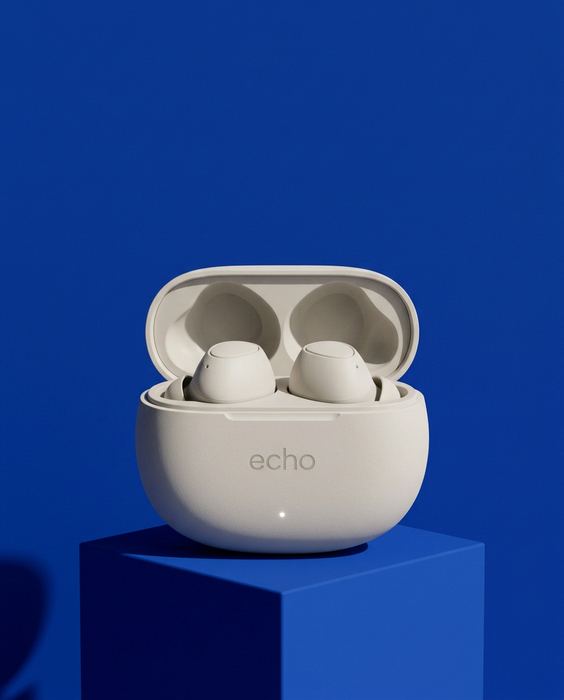
Tech brands all compete in the same white-and-grey look, so the backdrop colour is one of the few things that sets a product apart before anyone reads a word. We put one ECHO packshot on five backdrops and changed nothing else:
- Sage says natural and calm, for wellness and lifestyle tech,
- Cobalt says bold and smart, for sport and anything new,
- Blush says soft and personal, for beauty-adjacent gadgets,
- Black says premium, for a flagship or a launch,
- and a busy, clashing pattern shows what not to do: the backdrop wins the scroll, and the product loses it.
Pick one and use it everywhere: the product page, the ads and the feed. That's how a range of small white products starts to look like a brand. The prompts for all five are in product photo background colours.
4. Show it in use, at its real size
A packshot tells people what it looks like. An in-use shot tells them what it's like to own, and for electronics that's also where scale gets checked: how big the case is in a hand, how the headphones sit on a head.
For AURA we made a man by a window, eyes closed, a coffee in his hands and the headphones on: one quiet moment that says "this is what it sounds like". Two rules made it work:
- the product is in a real, slightly imperfect moment, not a pose,
- the size is right against the body: headphones that cover the ears, earbuds that fit in an ear.
If a person appears in more than one image, make a character sheet first and attach it, so the face stays the same. And for ads, make each image at the size it will run, rather than cropping one later: Stories, feed, square and banner each need their own composition. The sizes are in every ad size, one product.
5. One look for the whole range
Most tech brands sell more than one product or colourway. The range only reads as one brand if every image shares the same backdrop family, the same light and the same angle. Write that once (for ECHO: one backdrop colour, matching plinth, one light from one side, the case open at the same angle) and paste it into every prompt. How to write one: Don't copy a prompt, build a world.
Where we wouldn't use AI for electronics
This is the part most AI tool pages leave out.
- Specs and features. If an image shows a port, a button, a screen or an LED, it must be the real one in the real place. A buyer will hold you to it.
- Screens and interfaces. Don't let AI draw your app or display. Put the real screenshot onto the image afterwards.
- Accessories in the box. If the image shows a cable, a case or ear tips, they should be what actually ships.
- Colourways you haven't checked. AI recolouring is quick, and it drifts. Check each colour against the real product before it goes on a listing.
Where a platform or market requires AI disclosure, apply it. Honest, labelled, good-looking images still sell.
What it costs, roughly
A studio shoot for a set like this, several backdrops plus a lifestyle model, typically runs $2,000 or more and takes 2–3 weeks, with samples sent to the studio and back. Doing it yourself with ChatGPT or Gemini costs a subscription and your time, and you count every port yourself. Our Pilot is $199 for 8 images and a 15-second vertical video in 5 days, made from the photo you already have. Here's the side-by-side comparison.
Do it yourself, free
Everything above is written out step by step, with the exact prompts, in our free library (no email, no sign-up). For tech, start with product photo background colours, then run the AI product image checklist before anything goes live.
If you'd rather we did it, send one photo of your product and we'll send back a direction.
The free guides behind it.
 Step 06
Your backdrop is talking
Sage, cobalt, blush and black: what each backdrop colour says, the light that goes with it, and the one to avoid.
[ Open the guide → ]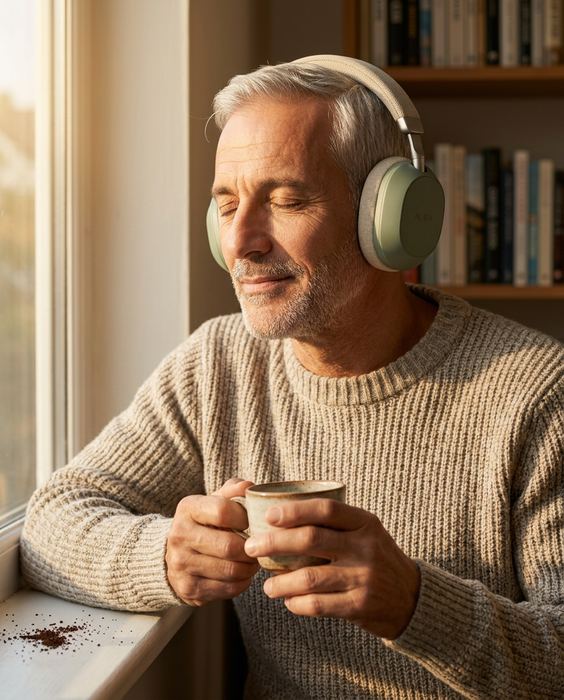 Step 04
The anatomy of a real-looking prompt
Who, what, scene, light, lens, one flaw. The full prompt behind the AURA image, part by part.
[ Open the guide → ] Step 11
Every ad size, one product
Stories, feed, square, banner and product page: the sizes, and what to keep clear in each.
[ Open the guide → ]