Nano Banana product photography prompts: edit your real photo, tested
Five Nano Banana (Gemini) prompts that edit your product photo: a new scene, new light, a new background, a season and object removal. All tested, one failed.
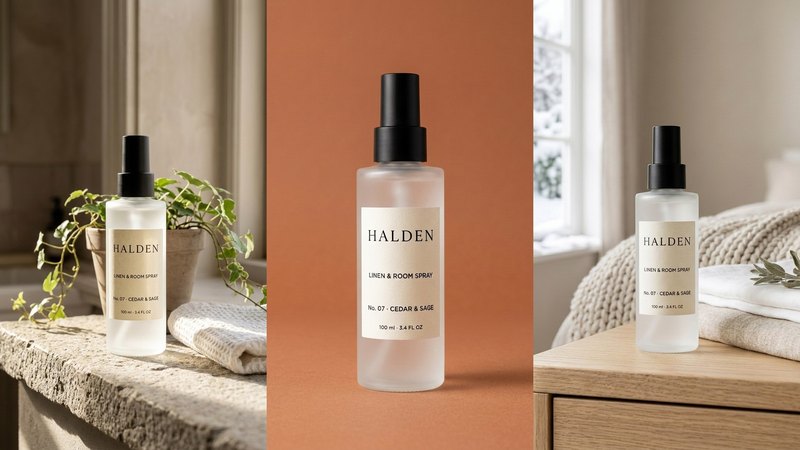
Nano Banana is Google's Gemini image model, and its strength is editing a photo you already have: move the product into a new scene, change the light, swap the background, or remove something. We ran five Nano Banana product photography prompts, once each, on one product. Four came back clean. One quietly changed the product, and that one teaches the most.
The product is HALDEN No. 07, a linen and room spray from a concept brand we made for this series (an invented brand, not a client). Its packshot and two scene photos stand in for your own.
How we tested. On 7 October 2026 we sent each prompt with one image to Gemini's Nano Banana model through the OpenRouter API (google/gemini-nano-banana-2.1), in 4:5 portrait. One run each, no retries. Each edit cost about $0.04, roughly a fifth of what the same request cost on OpenAI's image model in our ChatGPT prompt test.
The rule for every Nano Banana edit
Say what changes, then say what stays, and name it part by part. "Keep everything else the same" is not enough on its own. Every prompt below ends with "Portrait 4:5. Photorealistic. Do not add any other text, logos or labels."
When the product must stay identical, start with the same line we use for ChatGPT: "Use the product in this photo and keep it exactly as it is: the same [material and colour], [the cap, pump or lid], and the label text letter for letter: '[line 1]', '[line 2]'…"
1. Put the product in a new scene
Input: the plain packshot.
"Place this exact bottle on a stone windowsill in a sunlit bathroom with a small trailing plant and a folded white hand towel beside it, soft morning light, the label facing the camera."
What happened: a believable bathroom, with the label correct, letter for letter. The label paper came out a shade darker and warmer than the original, which is the warm light. Always compare colour against the real product.
2. Change only the light: the one that failed
Input: an existing bedroom photo of the bottle.
"Change only the light in this photo to warm late-afternoon golden-hour sun coming from the right, with long soft shadows across the table. Keep everything else in the photo exactly as it is, including the bottle, its label, the linen and the sage."
What happened: the golden light was lovely, and the label text survived. But the matte black spray pump came back bronze. We said "keep the bottle exactly as it is", yet the model read the warm light as permission to recolour the metal-looking part.
The fix is to name each part and its colour: "keep the spray pump matte black" in the same prompt. That is the whole lesson of this test: whatever you don't name, the model may "improve". It's also why our 5 AI mistakes we caught are all small details.
3. Swap the background
Input: the plain packshot.
"Replace only the background with a seamless warm terracotta backdrop and matching floor. Keep the bottle, its position, its size and its soft floor shadow exactly as they are."
What happened: clean. Same bottle, same size, same place, new colour. Backdrop colours, and what each one says about a brand, are in product photo background colours.
4. Change the season
Input: the same bedroom photo.
"Turn this into a winter scene: snow visible through the window and a chunky knitted throw on the bed. Keep the bottle, its label, the bedside table, the linen and the sage exactly as they are."
What happened: snow outside and a knitted throw, with the bottle and table untouched. Good for turning one photo into a seasonal set. More seasonal ideas are in holiday product photography from one packshot.
5. Remove something
Input: a hallway photo with a coat on a hook and a woven basket.
"Remove the coat on the hook and the woven basket, and fill the space naturally with the wall and the console top. Keep everything else, including the bottle, its label and the key dish, exactly as it is."
What happened: both gone, the wall and console filled in naturally, and the framing unchanged. Removal was the most reliable edit of the five.
How to keep a whole set consistent
Nano Banana makes each image on its own, so a series can drift: the light, the props, the product's size. To keep a set together:
- Always edit from the same original photo, not from the last result.
- Write the brand's world once, with its palette, light and props, and paste it into every prompt. How: don't copy a prompt, build a world.
- Name every part of the product and its colour in every prompt, as the pump taught us.
- Check each image against the original before it goes anywhere: the AI product image checklist.
Where we wouldn't use it
- The main marketplace image. Use a real photo of your real product.
- Exact colour matches. Light edits can shift colours, as they did on our pump. Where the colour is part of the product (paint, cosmetics, fabric), check it against the real thing every time.
- Fine print. Put the real label on afterwards.
Where a platform or market requires AI disclosure, apply it.
What it costs, roughly
At about $0.04 an edit, Nano Banana is the cheapest way we know to turn one product photo into many. What costs time is the checking. A studio shoot for a set like this typically runs $2,000 or more and takes 2–3 weeks. Our Pilot is $199 for 8 images and a 15-second vertical video in 5 days, made from the photo you already have. Here's the side-by-side comparison.
If you'd rather we did it, send one photo of your product and we'll send back a direction.
The free guides behind it.
 Step 05
Don't copy a prompt. Build a world.
Palette, light, place and props written once, then used in every shot, so the set reads as one brand.
[ Open the guide → ] Step 03
5 scenes that sell any product
Window light, hard shadow, the pour, in hand, the table: five prompts for anything you sell.
[ Open the guide → ] Step 01 · Start here
The AI product image checklist
Lock the product, go close, test the colour, build the world. The checks we run on every set.
[ Open the guide → ]