Does ChatGPT change your product? We tested it, and here's how to stop it
We gave OpenAI's image model one product photo and two prompts. The label survived both, but the lazy prompt still changed the size, framing and focus.
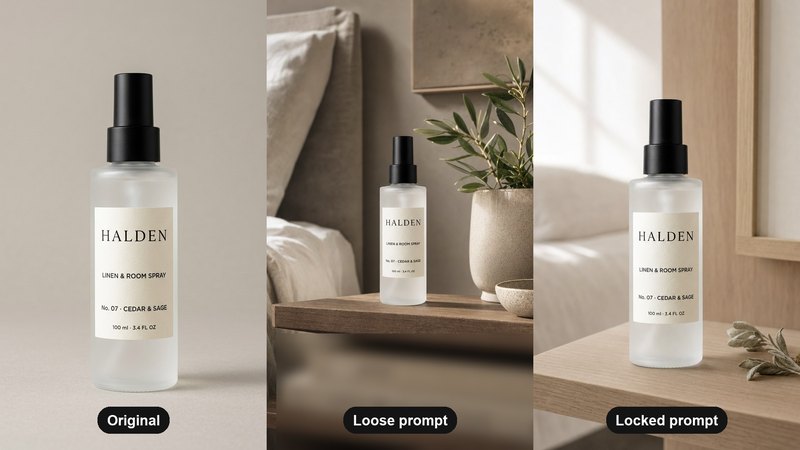
"ChatGPT keeps changing my logo" is one of the most common complaints from people making product photos with AI. You ask for a new background and get back a slightly different product: a redrawn logo, a misspelt line on the label, a bottle that is a little too tall. On forums like the OpenAI community and Google's AI developer forum, people ask how to keep a logo intact, and the threads rarely end with a clear fix.
So we tested it. On 7 October 2026 we gave OpenAI's current image model, called through its API (gpt-5.4-image-2), one product photo and two prompts, once each, with no retries. The ChatGPT app may give slightly different results.
The product was HALDEN No. 07, a linen and room spray from a concept brand we made for this article series (an invented brand, not a client). Its label has four lines of text, from a large wordmark down to "100 ml · 3.4 FL OZ", which makes it a good test. Its packshot stands in for your own product photo.
1. What happened: the label held, the photo didn't
The loose prompt was what most people type: "Put this room spray on a bedroom shelf with plants, make it look luxury."
The locked prompt said exactly what may change and what may not: "Edit this photo. Keep the bottle exactly as it is: the same shape, frosted white glass, matte black spray pump, and the label text unchanged, letter for letter: 'HALDEN', 'LINEN & ROOM SPRAY', 'No. 07 · CEDAR & SAGE', '100 ml · 3.4 FL OZ'. Change only the background and the light: place it on a pale oak shelf in a calm bedroom with a small sprig of dried sage beside it, soft window light from the left, a gentle contact shadow under the bottle. Keep the same camera angle, and the bottle the same size in the frame. Portrait 4:5. Do not add, remove or restyle any text."
What came back, checked at full size against the original:
- The label text survived both prompts, letter for letter. With a clean, sharp packshot and large type, the current model no longer mangles a simple label the way older models did.
- The loose prompt still changed the photo. The bottle shrank from about 70% of the frame's height to under 40%. "Luxury" brought in an olive tree in a stone pot, a ceramic bowl, a framed artwork, a bed and a stack of books, and the book spines carried printed titles we never asked for, one of them reading like a real publication's (we blurred them in the image above). The product stopped being the hero.
- The locked prompt kept the bottle upright, at the same angle and close to its original size (about 60% of the frame), with soft side light and the sage sprig as asked. The room behind it is new, which is exactly what we asked for.
So when people say AI "changes the product", the label is no longer the only thing to watch. Scale, framing and focus change too, and they decide whether the image sells.
2. Five reasons AI changes your product
1. It redraws the image. An AI edit is a new picture made to resemble your photo, not your photo with a new background pasted behind it. Every pixel of the product is drawn again.
2. It fills every gap you leave. "Make it luxury" is an open invitation, so the model adds what it thinks luxury looks like: gold, marble and props. Anything you don't pin down is a decision the model makes for you.
3. Small text is the hardest part. A big wordmark has a lot of pixels to copy. An ingredient list or fine print does not, and that is where letters drift. Our 5 AI mistakes we caught shows a misspelt label.
4. Edits pile up. Asking for "the same, but brighter" makes a copy of a copy. Each round is a fresh redraw, so small changes add up across a conversation.
5. A weak source photo forces guesses. If the label is blurry, cropped or in shadow, the model has to invent what it can't see.
3. How to stop it: the locked prompt
The locked prompt works because it does three things:
- It lists what must not change: shape, materials, colours, and every line of text, spelled out exactly as printed.
- It lists the only things that may change: background, surface, light and shadow.
- It fixes the camera: the same angle, and the product the same size in the frame.
And a few habits matter as much as the wording:
- Always edit from the original packshot, never from the last result. Start a new conversation if you have to.
- Change one thing per prompt. A new background, then new light, not both at once.
- Use the sharpest, most evenly lit photo you have, with the label facing the camera.
- Ask for the size you need, such as 4:5 for an Instagram feed, rather than cropping a square later.
How to build a prompt like this from scratch, part by part, is in the anatomy of a real-looking prompt. The four lines to decide before you write it are in how to brief an AI image.
4. The 30-second check before anything goes live
Put the result next to the original at full size and check:
- Text: every word and number on the label, letter by letter.
- Logo: the shape, the spacing, the weight.
- Colour: the glass, the cap and the label colour, under neutral light.
- Shape and scale: height to width, and size against anything nearby.
- Extras: anything that wasn't in the prompt, especially any new text, like the book titles in our test.
If one of these fails, don't ask for a fix on that image. Go back to the original and run the prompt again with the failed part named. The full list we use is the AI product image checklist.
Where we wouldn't use AI for this
- Ingredient lists, warnings and dosage text. If a buyer or a regulator will read the small print, put the real label onto the image afterwards instead of trusting a redraw.
- The main marketplace image. It should be your real product photo. Use AI for the scenes around it.
- Anything you can't check. If nobody on your team will compare the result with the real product, don't publish it.
Where a platform or market asks for AI disclosure, apply it. Honest images still sell.
What it costs, roughly
Doing it yourself costs a ChatGPT subscription and your time: every image checked by hand, and retries when it drifts. A studio shoot for a set of scenes typically runs $2,000 or more and takes 2–3 weeks. Our Pilot is $199 for 8 images and a 15-second vertical video in 5 days, made from the photo you already have. Here's the side-by-side comparison.
If you'd rather we did it, send one photo of your product and we'll send back a direction.
The free guides behind it.
 Step 01 · Start here
The AI product image checklist
Lock the product, go close, test the colour, build the world. The checks we run on every set.
[ Open the guide → ] Step 04
The anatomy of a real-looking prompt
Who, what, scene, light, lens, one flaw. The full prompt behind the AURA image, part by part.
[ Open the guide → ] Step 15
5 AI mistakes we caught
Three hands, a misspelt label, impossible physics, the wrong build order and video drift, with the check for each.
[ Open the guide → ]