AI product photography for shoes: the pair, the sole and the laces, done right
How we make AI shoe images that hold up: one honest packshot, a pair that matches, laces that obey gravity, a shot list, and where shoe brands should skip AI.
Shoes are one of the hardest products to fake and one of the most tempting to try. A launch needs a lot of images: side, top, sole, heel, the pair, a detail of every material, and something with movement for the ads. That's a lot of setups for a small brand.
So it makes sense that AI product photography for shoes is a busy search. The top results are mostly tool pages and "best AI tools" lists. They tell you which button to press. They don't tell you why so many AI sneaker images look slightly wrong, or which images you should never let AI make.
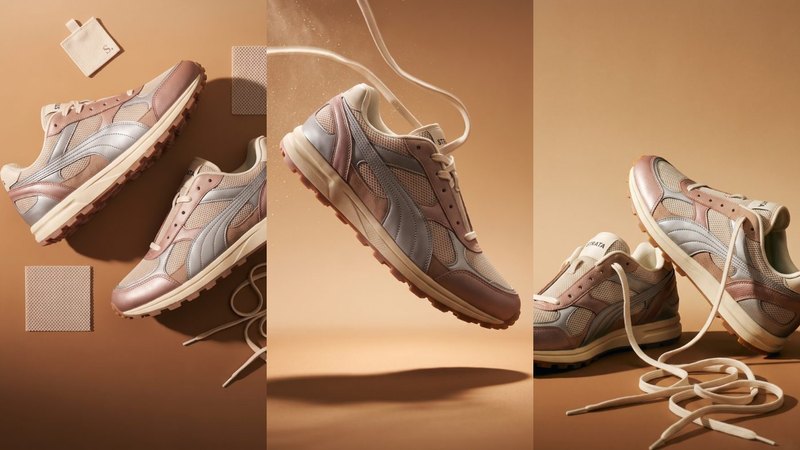
We make AI product images and video ads for DTC brands. To work out what holds up for footwear, we invented a shoe, the Strata Trail 02 (rose metallic leather, silver overlays, an oat mesh upper and a cream sole), and built a launch set from one packshot. Strata is a concept brand, not a client. Here's what it taught us.
1. Start from one honest packshot, and know where shoes drift
Every scene copies the shoe from somewhere, so that somewhere has to be right. For Strata the input was one clean side view: the outer side of the right shoe, laced, on a plain background, in soft even light. A phone photo is fine if it's sharp and the colour is true.
Then check every image against it. Shoes drift in more places than most products:
- the overlays: the number of panels, where each one starts and stops, and which ones are metallic,
- the eyelets: count them. AI adds or drops one all the time,
- the sole: the tread pattern, the colour of the midsole, and how thick it is at the heel,
- the small print: the tongue label, the heel tab and any text on the midsole.
If any of that changes, fix it or make the image again. A customer who orders the shoe in the picture should get the shoe in the picture.
2. Make the pair match
Most shoe images show two shoes, and that's where AI gives itself away. A real pair is a mirror image: the overlays sit on the outside of both feet, and both shoes have the same lacing, the same eyelets and the same sole. Generated pairs often come out as two right shoes, or as two slightly different shoes.
For "The pair" in the Strata set we did three things:
- named it in the prompt: a left and a right shoe, mirror images of each other,
- gave the second shoe a reference too (a flipped copy of the packshot works as a starting point),
- checked both shoes side by side against the original, panel by panel.
If a pair keeps coming out wrong, show one shoe in front of the other, so the back one is partly hidden. It's a real composition that people use anyway.
3. Give the laces and the light some physics
Laces are the second giveaway. Real laces are flat or round, have a set thickness, and hang or fly the way gravity tells them to. AI laces melt into the shoe, pass through each other, or go stiff like wire.
In the Strata mid-air image, the shoe floats over a warm studio floor with the laces flying loose and a little dust kicking up. What made it read as real was saying the physics out loud:
- the laces are flat, cream, and trail behind the direction of movement,
- the shoe casts a soft shadow on the floor below it, so you can tell how high it is,
- the metallic leather reflects the warm backdrop, and the mesh doesn't reflect at all.
That last point counts for any shoe made of more than one material. Leather, mesh, suede and rubber each catch light differently. If everything in the image has the same sheen, the shoe looks like a render. More motion ideas, with prompts, are in 4 AI effects worth stealing.
4. Build the launch set as a shot list
"Sneaker product photo, studio lighting" gives you the same side view, five times. For Strata we wrote a shot list first, and each image has a job:
1. Mid-air, new arrival: the shoe floating, laces flying. The scroll stopper.
2. Campaign line: both shoes close and low, with "Built in layers" set on the image.
3. The pair: both shoes standing, laces loose, for the product page.
4. Material flat lay: the pair from above with leather and mesh swatches and a spare lace, so people see what it's made of.
5. Mesh macro: close on an eyelet and the engineered mesh.
6. Lace macro: the laces in a loose pile, for texture.
7. Outsole: the shoe tipped up to show the tread and the midsole.
You can see all seven in our work. The outsole and the macros are the ones most brands skip, and they're the ones that answer a buyer's real questions: what's it made of, and what's under it.
5. One world, then the ads and the motion
Strata lives in one warm world: tan and sand backdrops, a soft key light from one side, cream, rose and silver. We wrote that once and pasted the same block into every prompt, so a macro and a mid-air shot still look like one campaign. How to write one: Don't copy a prompt, build a world.
For on-foot images, the rule is the same as for the shoe: the person and the setting should look like a real moment, not a pose. Our candid prompts start with a running track for that reason.
Make the video from your best still, not from scratch, so the shoe stays the same. A slow turn or the mid-air shot with the laces settling is often enough for a 15-second ad. The method is in AI product video from one image.
Where we wouldn't use AI for shoes
This is the part most AI tool pages leave out.
- Fit and sizing. How a shoe sits on a foot, how wide the toe box is, how the heel holds: show that with your real shoe on a real foot. A generated foot will always fit perfectly, and that's the problem.
- Performance claims. Grip on a wet trail, cushioning, waterproofing: if the picture shows what the shoe does, it must be your real shoe doing it.
- Colour people will match. Shoes are bought to go with an outfit. Check every colourway against the real pair on a calibrated screen. AI colour drifts, and metallics drift most.
- Every colourway on the product page. If you sell six colours, each listing needs the real colour. Don't let AI recolour one shoe into five you haven't checked against the real thing.
Where a platform or market requires AI disclosure, apply it. Labelled, honest, good-looking images still sell.
What it costs, roughly
A studio shoot for a set like this typically runs $2,000 or more and takes 2–3 weeks, with samples posted to the studio and back. Doing it yourself with ChatGPT or Gemini costs a subscription and your time, and you count every eyelet yourself. Our Pilot is $199 for 8 images and a 15-second vertical video in 5 days, made from the photo you already have. Here's the side-by-side comparison.
Do it yourself, free
Everything above is written out step by step, with the exact prompts, in our free library (no email, no sign-up). Start with the AI product image checklist: lock the product, go close, test the colour, build the world.
If you'd rather we did it, send one photo of your product and we'll send back a direction.
The free guides behind it.
 Step 01 · Start here
The AI product image checklist
Lock the product, go close, test the colour, build the world. The checks we run on every set.
[ Open the guide → ]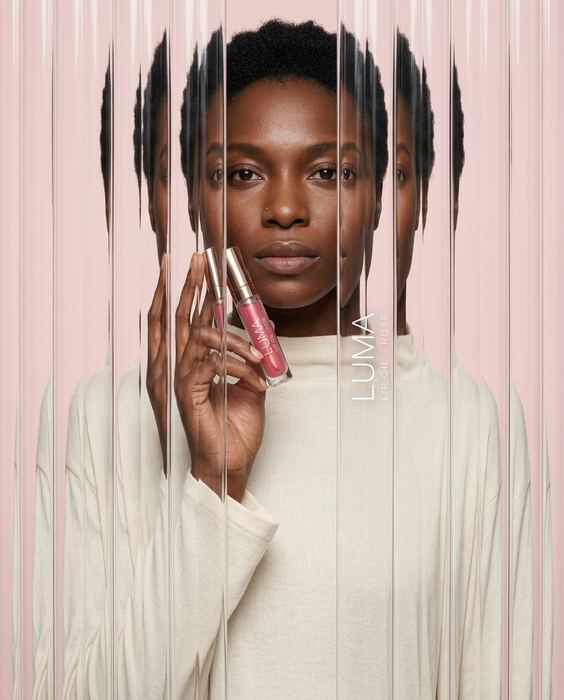 Step 09
4 AI effects worth stealing
Fluted glass, anti-gravity, motion blur and acrylic paint, with the label still readable.
[ Open the guide → ]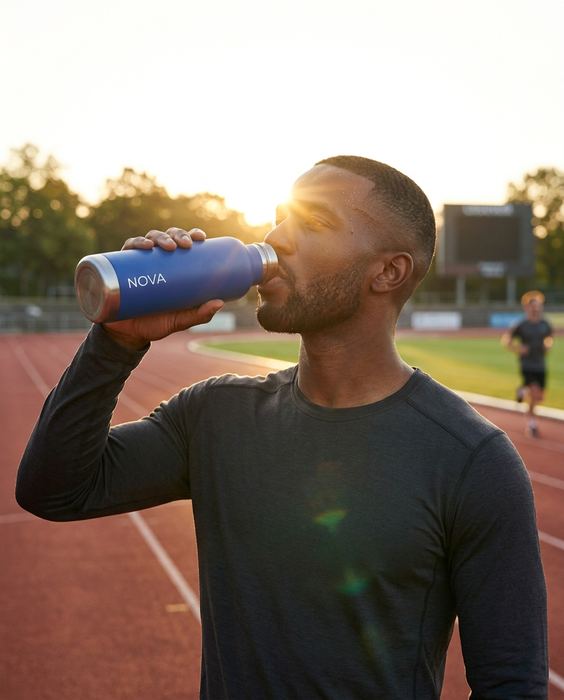 Step 07
4 candid prompts that look real
The track, the gym, the commute, the desk. How to make on-model shots read as real life.
[ Open the guide → ]