AI product photography for candle brands: flame, wax and warm light that look real
Flame, wax, warm light and a label that stays the same: how we make AI candle images look real, the shot list we use, and where a candle brand shouldn't use AI.
A candle is sold on a feeling. Nobody can smell it through a screen, so the photo has to do the work: the glow, the room, the hour of the evening it belongs to.
That's why AI product photography for candle brands is so tempting, and why it goes wrong so often. Most AI candle images look like the same beige room with the same golden blur. Customers have seen them a thousand times, and some have learned not to trust them. In a candle makers' group we read, the top answer to "which AI app should I use?" was a warning: unnatural backgrounds make people distrust the product.
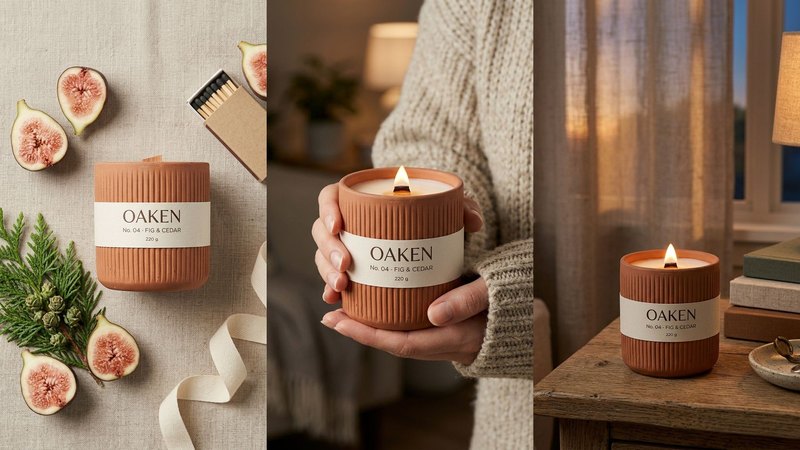
We make AI product images and video ads for DTC brands. To find out what works for candles, we invented a candle brand, OAKEN (No. 04, fig and cedar, in a fluted terracotta vessel), and built a launch set from one packshot. OAKEN is a concept brand, not a client. Here's what it taught us.
1. Start from one honest packshot
Every scene copies the candle from somewhere, so that somewhere has to be right. For OAKEN the input was a single plain packshot: candle unlit, label facing the camera, soft daylight, a grey background. A phone photo is fine.
Then check every generated image against it, letter by letter. Candles drift in three places:
- the label: the scent name, the number and the weight (ours reads "No. 04 · FIG & CEDAR · 220 g"),
- the vessel: the ribs on the terracotta, the rim, the colour of the clay,
- the wick: a wood wick must stay a wood wick, not turn into a cotton one.
If anything changes, fix it or make the image again. A customer who orders the candle in the picture should get the candle in the picture.
2. Light the flame like a real flame
The flame is where AI candle images give themselves away. A real flame is small, teardrop-shaped, brighter at the base than people expect, and it lights everything close to it: the wax pool, the inside of the rim, the fingers holding the jar. Most generated flames are too big, too even, and light nothing.
What made the OAKEN images read as real was naming the physics in the prompt:
- the flame is the warmest light in the frame and falls off quickly,
- the wax pool is clear near the wick and creamy at the edges,
- the glow sits on the inside wall of the vessel, not on the label,
- the rest of the room is lit by a second, cooler source, like a window at dusk.
That last point matters. One warm source plus one cool source is what an evening room looks like. Two warm sources look like an ad.
3. Build the launch set as a shot list, not a mood board
"Cozy candle aesthetic" gives you one image, five times. For OAKEN we wrote a shot list first, and each image has a job:
1. Lifestyle: the lit candle on a bedside table at dusk, so people see where it lives.
2. The stopper: the candle alone on a bold terracotta background, made to stop the scroll.
3. Flat lay: the unlit candle with what the scent is made of (cut figs, a cedar sprig, matches, a ribbon).
4. In hand: two hands in a knit sleeve holding the lit candle, for scale and warmth.
5. Detail: close on the flame, the wax pool and the wood wick.
6. Packshot: the clean original, for the product page.
You can see all six in our work. The flat lay is the one most candle brands skip, and it's the one that sells the scent: it shows the notes as things you can almost smell. More scene ideas, with prompts, are in AI product photography scene ideas.
4. Give the brand one world, then stay in it
A fig and cedar candle belongs to autumn evenings: terracotta, oat linen, cedar green, low lamp light. We wrote that world once (palette, light, materials, props, time of day) and pasted the same block into every prompt. So a flat lay on linen and a bedside table at dusk still look like one brand.
If you sell several scents, give each one its own small world inside the brand's. A sea salt candle shouldn't live in the same room as fig and cedar. How to write one: Don't copy a prompt, build a world.
5. Make the ad sizes and the motion separately
Candles are good on video, because a flame moves even when nothing else does. A slow push-in on a lit candle is often enough for a 15-second ad. Make the film from your best still rather than asking for a video from scratch, so the label stays the same. The method is in AI product video from one image.
For stills, make 9:16, 4:5 and 1:1 as separate images, each composed for its placement, and keep the top and bottom of a Story clear for the app's buttons. The sizes are in Every ad size, one product.
Where we wouldn't use AI for candles
This is the part most AI tool pages leave out.
- Burn and performance claims. An image of an even melt pool or a "50-hour burn" has to be your real candle, burned and photographed by you. If the picture shows how the product performs, it must be true.
- Colour your customers will match. If people choose a candle to match a room, check the wax and vessel colour against the real thing on a calibrated screen. AI colour drifts.
- Unsafe scenes. AI will happily put a lit candle next to a dried bouquet, under a curtain or on a bed. Your customers copy what they see, and a regulator or a platform may not like it either. Check every lit scene the way you'd check a real room.
- Safety labels and warnings. Never let AI make, change or remove the warning text on your packaging. Use the real label.
Where a platform or market requires AI disclosure, apply it. Labelled, honest, good-looking images still sell.
What it costs, roughly
A studio shoot for a set like this typically runs $2,000 or more and takes 2–3 weeks, with candles posted to the studio and burned on set. Doing it yourself with ChatGPT or Gemini costs a subscription and your time, and you check every label and every flame yourself. Our Pilot is $199 for 8 images and a 15-second vertical video in 5 days, made from the photo you already have. Here's the side-by-side comparison.
Do it yourself, free
Everything above is written out step by step, with the exact prompts, in our free library (no email, no sign-up). Start with the AI product image checklist, which uses the OAKEN set as its example.
If you'd rather we did it, send one photo of your product and we'll send back a direction.
The free guides behind it.
 Step 01 · Start here
The AI product image checklist
Lock the product, go close, test the colour, build the world. The checks we run on every set.
[ Open the guide → ] Step 03
5 scenes that sell any product
Window light, hard shadow, the pour, in hand, the table: five prompts for anything you sell.
[ Open the guide → ] Step 05
Don't copy a prompt. Build a world.
Palette, light, place and props written once, then used in every shot, so the set reads as one brand.
[ Open the guide → ]