AI jewelry product photography: keep the metal, the shine and the size real
How we make AI images for jewelry brands: gold that reads as metal, a pair that stays a pair, a true size on a model, and where jewelers should skip AI.
Jewelry is the hardest small product to sell in a picture. A pair of earrings is tiny, shiny and personal. The image has to show the metal, the shape and the size, and it has to make someone want to wear it. A studio does that with macro lenses, light tents and a model on set, which is why jewelry is often priced as the most complex tier in a studio's per-image rate card.
So AI jewelry product photography is a growing search. The top results today are mostly tool pages and long prompt lists. Some of the advice is good: give the AI the real dimensions, name the metal and the cut, start from a clean reference photo. What those pages skip is the part a buyer notices first: gold that turns into plastic, a pair that stops matching, and earrings that grow two sizes between the box and the ear.
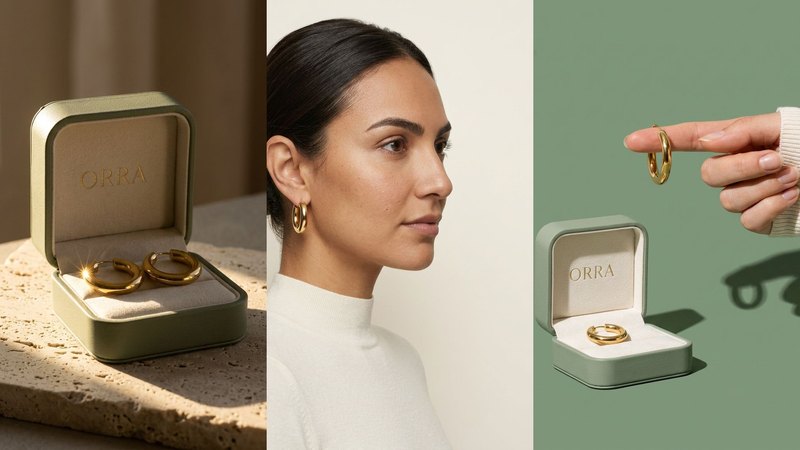
We make AI product images and video ads for DTC brands. To learn what holds up for jewelry, we invented ORRA, a pair of chunky gold hoop earrings in a sage-green box with an ivory insert, and built a set from one packshot. ORRA is a concept brand, not a client. Here's what it taught us.
1. Start from one honest packshot
Every scene copies the piece from somewhere, so that somewhere has to be right. For ORRA the input was one plain front view: the open box on a soft grey background, both hoops sitting in the insert, even light. A sharp phone photo with true colour is enough, as long as the whole piece is in frame and nothing else sparkles next to it.
Then check every image against it. Jewelry drifts in a few predictable places:
- the count: a pair is two. AI likes to add a third hoop, merge two into one, or show one ear with an earring and the other bare,
- the shape and thickness: a chunky hoop turns thin, an oval turns round, a huggie turns into a large hoop,
- the closure: hinges, clasps and posts are tiny, and AI redraws them as it likes,
- the stones: if your piece has stones, count them and check the cut. AI rounds edges and makes stones bigger and sharper than they are,
- the box: ORRA's name is printed in gold on the lid. Read it every time.
If any of that changes, fix it or make the image again. A buyer who orders the piece in the picture should get the piece in the picture.
2. Make the metal read as metal
This is where AI jewelry gives itself away. Real gold has weight: a bright highlight, a darker edge, and the colour of the room reflected in its curve. AI gold often turns into one smooth yellow surface, like plastic, or it shines everywhere at once.
What fixed it for ORRA was one hard light source, named out loud. In the light image the open box sits on rough travertine in a single beam of late-afternoon window light from the left. The shadows are long and crisp, and there's one bright glint on each hoop. Soft light everywhere makes gold flat. One hard light gives it a shape.
Two more words help:
- "polished" for a mirror finish, or "brushed" for a satin one. Without it, AI picks for you, and it changes from image to image.
- "realistic reflections", plus what's being reflected: the window, the stone, the sleeve. Reflections from nothing look like a filter.
3. Show the true size
Size is the question every jewelry buyer has, and AI makes it worse. Ask for "gold hoop earrings on a model" and the hoops come back at whatever size looks good to the model. That's a return waiting to happen.
Three things keep the size honest:
- Write the real size into the prompt. Something like "hoops about 2 cm across, 4 mm thick" gives the AI a scale to hold.
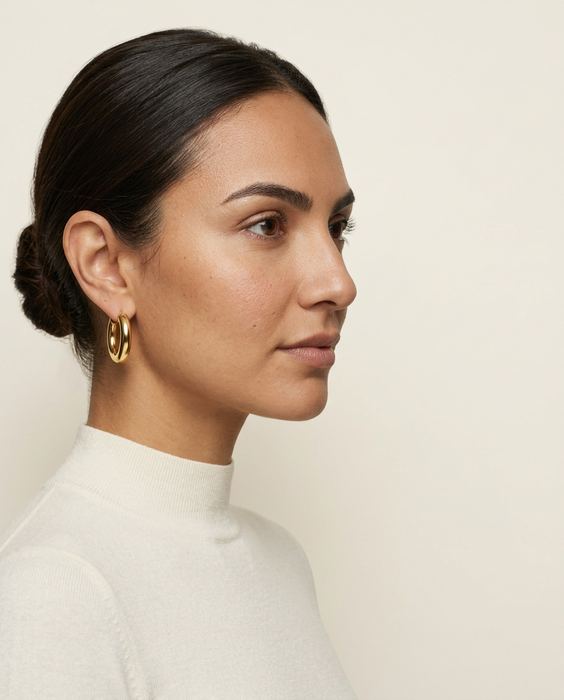
- Use the body as a ruler. In ORRA's profile image the model wears the hoops in side profile, so the earring sits next to the ear and jaw, which everyone knows the size of. Check the hoop against the earlobe in every image.
- A hand for scale. In the scroll-stopper, one hoop hangs from the tip of an index finger against a sage backdrop. A fingertip is a ruler too, as long as the finger has the right number of joints.
The same model appears in every on-model image, from one character sheet: front, three-quarter, profile and a smile. She wears a plain ivory high-neck top, so nothing competes with the gold.
4. Brief it before you prompt it
"Gold earrings, a woman, nice lighting" leaves every decision to the AI, and you get the same image everyone else gets. For ORRA we made four decisions first, and each image answers one of them:
1. Purpose: what must this image do? The fingertip shot is there to stop the scroll in an ad.
2. Composition: where does the text go? The profile shot keeps the face in the left third and a plain ivory wall on the right, empty for a headline.
3. Light: one source, from where? The travertine shot.
4. Style: the palette, word for word. The flat lay uses only the brand's colours: the sage box, ivory linen, an olive sprig and a small ivory dish.
The four-line brief and the exact prompt behind each ORRA image are in Brief it first. You can see the whole set in our work.
5. Hands and ears get checked at full size
Jewelry puts AI's weakest parts in the frame: fingers, ears and the place where metal meets skin. Before any jewelry image goes out, we zoom in and check:
- hands: one thumb and four fingers, nails that belong to the same person, a ring that sits on a finger and not through it,
- ears: an earring that goes through the lobe, not floating beside it, and the same ear shape from image to image,
- chains: a necklace that lies flat with gravity, a clasp at the back, and links that don't melt into each other.
The mistakes we've caught on real sets, and the check that catches each one, are in five AI product photo mistakes.
Where we wouldn't use AI for jewelry
This is the part most AI tool pages leave out.
- The product page's main image. Marketplaces generally ask for a photo of the actual item, and buyers zoom in. Use a real photo of the real piece there, and use AI for the scenes around it. Check your platform's current image rules before you list.
- Stones, carats and metal claims. If the listing says 14k gold, lab-grown diamond or a certain carat weight, the image of the stone and the metal must come from the real piece. A generated stone is a promise you can't keep.
- Custom and engraved pieces. Show the buyer a real finished example. A generated engraving is just letters the AI drew.
- Your customers' photos. Reviews and "worn by you" posts should show real people wearing your real jewelry, never generated ones.
Where a platform or market requires AI disclosure, apply it. Labelled, honest, good-looking images still sell.
What it costs, roughly
A studio shoot for a jewelry set with macro work and a model typically runs $2,000 or more and takes 2–3 weeks, with the pieces posted to the studio. Doing it yourself with ChatGPT or Gemini costs a subscription and your time, and you check every hoop, stone and finger yourself. Our Pilot is $199 for 8 images and a 15-second vertical video in 5 days, made from the photo you already have. Here's the side-by-side comparison.
Do it yourself, free
Everything above is written out step by step, with the exact prompts, in our free library (no email, no sign-up). Start with the AI product image checklist: lock the product, go close, test the colour, build the world.
If you'd rather we did it, send one photo of your product and we'll send back a direction.
The free guides behind it.
 Step 02
Brief it like a campaign
Purpose, composition, light, style: the four lines we write before every prompt, one shot each.
[ Open the guide → ] Step 15
5 AI mistakes we caught
Three hands, a misspelt label, impossible physics, the wrong build order and video drift, with the check for each.
[ Open the guide → ] Step 01 · Start here
The AI product image checklist
Lock the product, go close, test the colour, build the world. The checks we run on every set.
[ Open the guide → ]